
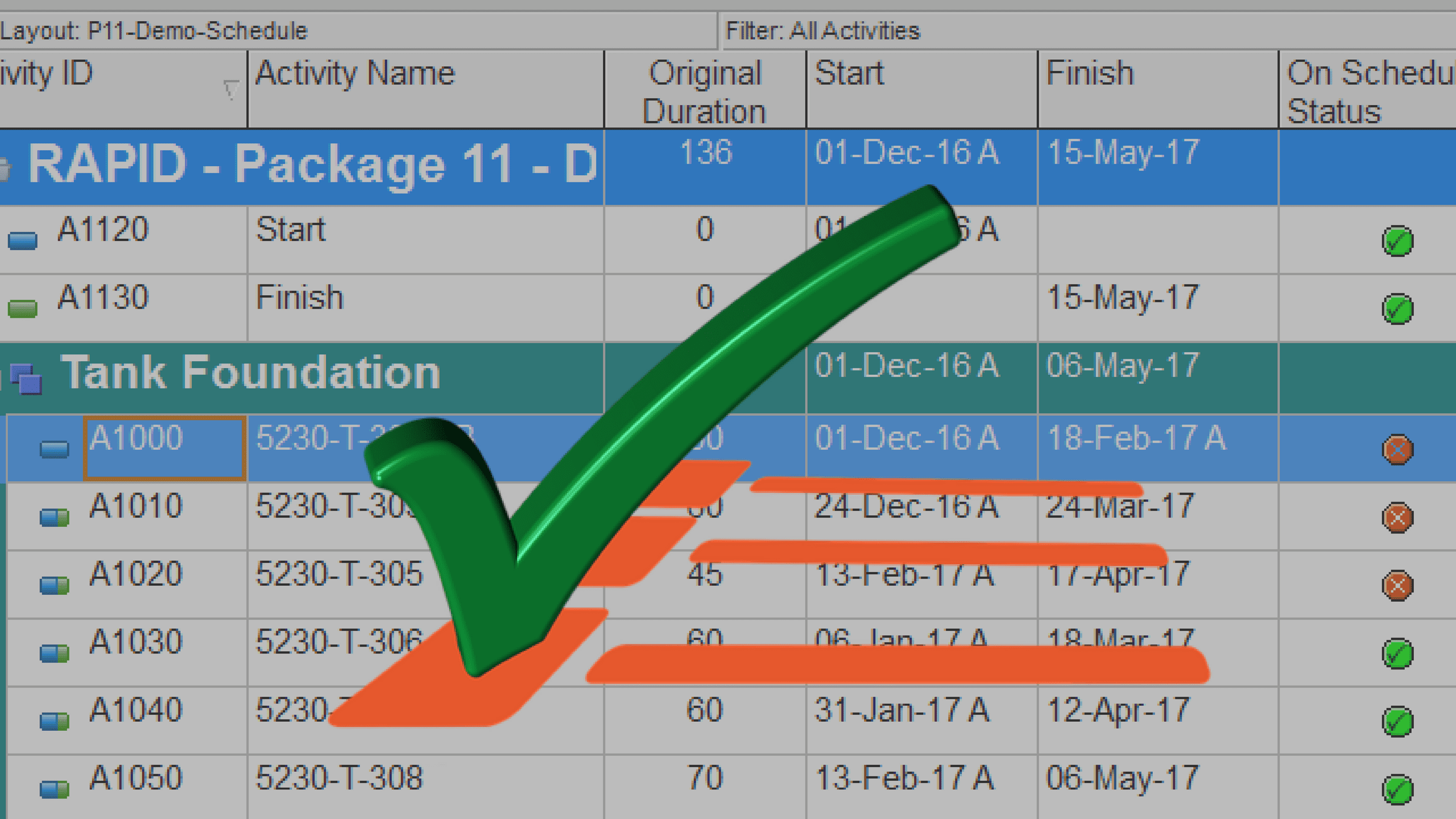
Have you ever wondered how you can quickly detect the activities in the schedule that are behind?
Did you know that in Primavera P6, you can quickly identify behind schedule and over budget activities by using graphical indicator in User Defined Fields (UDF)?
In this tutorial, I will show you how to define User Defined Field indicators in Primavera P6.
Schedule Status User Defined Field Indicators
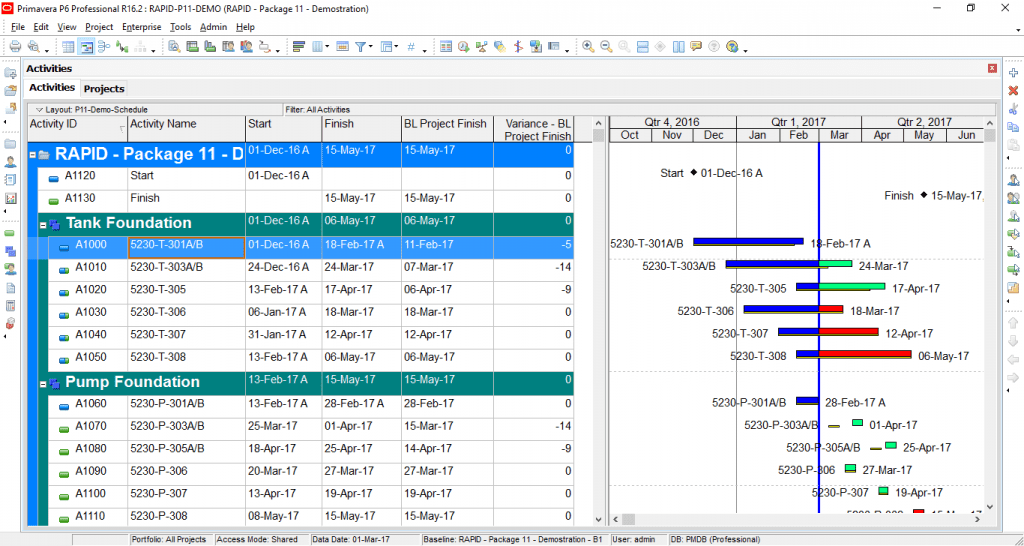
Consider the following updated schedule. To show the deviation from the baseline, add the following two columns in your activity table:
BL Project Finish: Baseline Project Finish shows the activity baseline finish date from the Project Baseline.
Variance – BL Project Finish: The variance with the BL Project finish column shows the variance (duration) between the Baseline Project Finish date and the current Finish date. It is calculated as:
Variance-BL Project Finish= BL Project Finish – Finish
Step 1: Add User Defined Fields (UDFs)
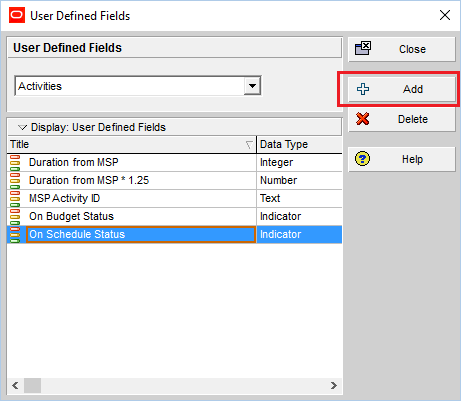
Go to the Enterprise menu -> User Defined Fields.
Click Add to create new.
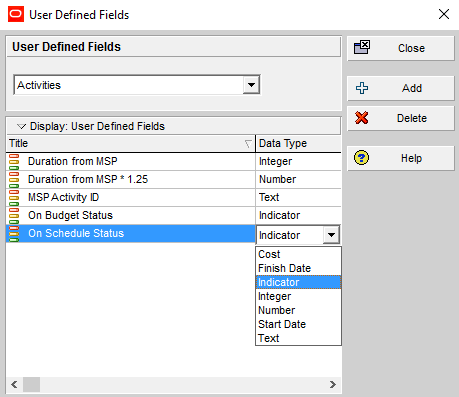
Step 2: Select the “Data Type” as “Indicator”
Enter the Title for your user defined field and select “indicator” as the “Data Type”
Step 3: Apply the “Global Change”
Now to apply the “On Schedule Status” indicators to the entire schedule, apply the Global Change:
Go to the Tools menu -> Global Change.
Click New.
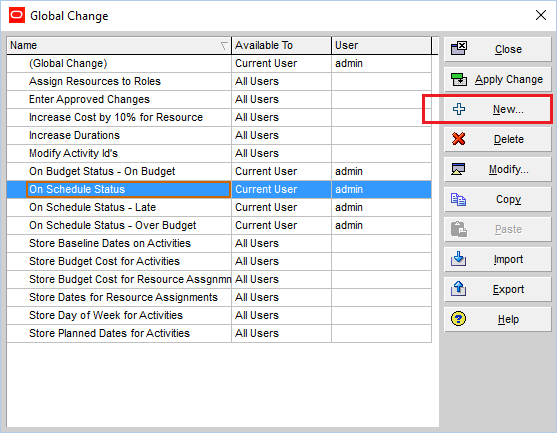
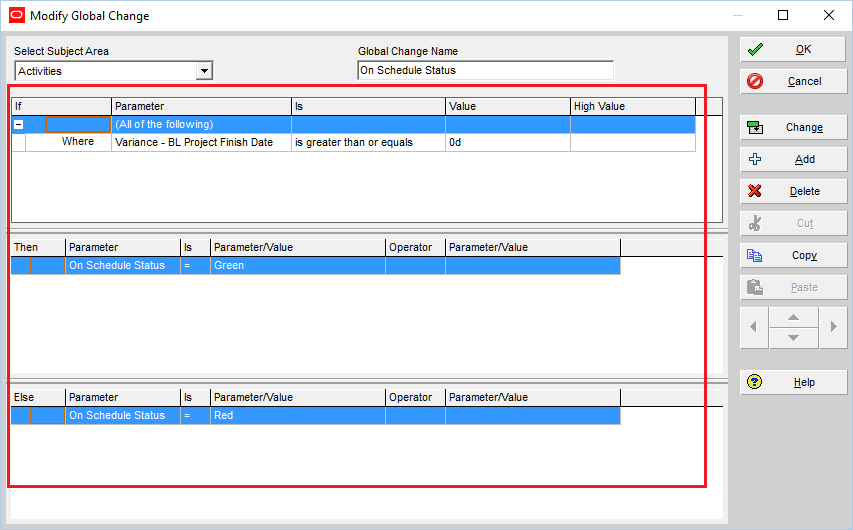
After creating a new global change, define the schedule status indicator parameters as illustrated below:
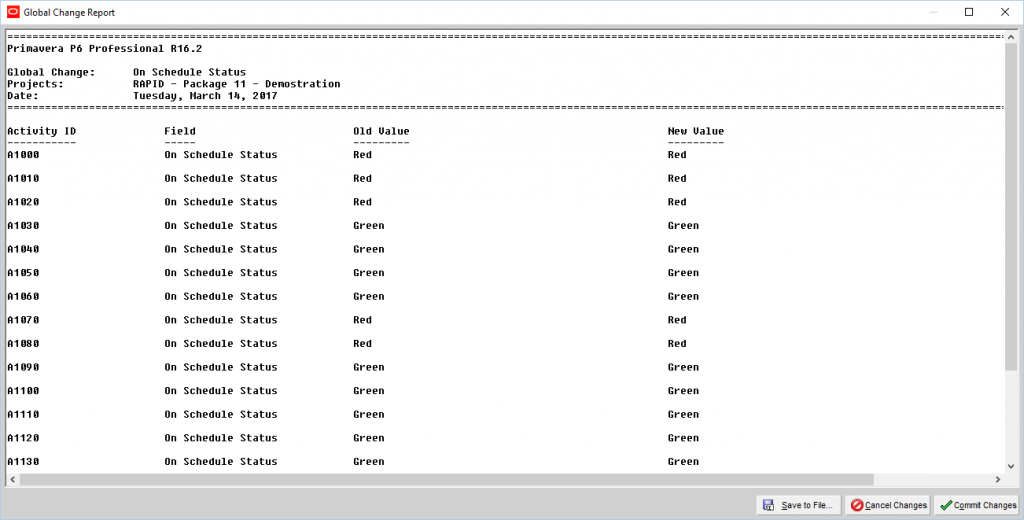
Then click on the “Change” button to Commit the Change on the entire schedule.
Check the Global Change Report, click “OK” and then “Close”.
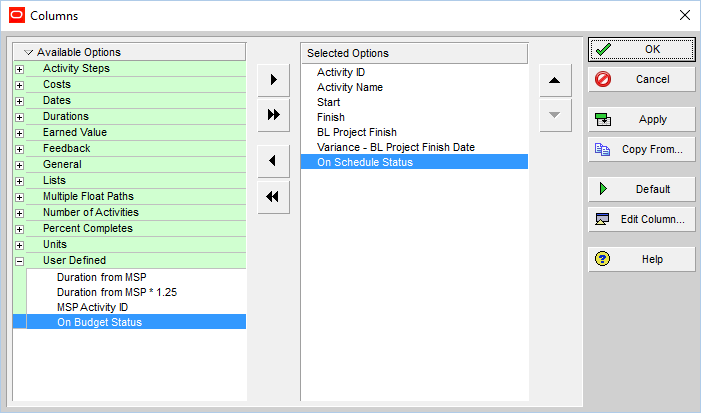
Step 4: Add the Schedule Indicator Column to the Activity Table
To visually see the schedule status add the “On Schedule Status” User Defined Field to the activity table:
Here is the result:
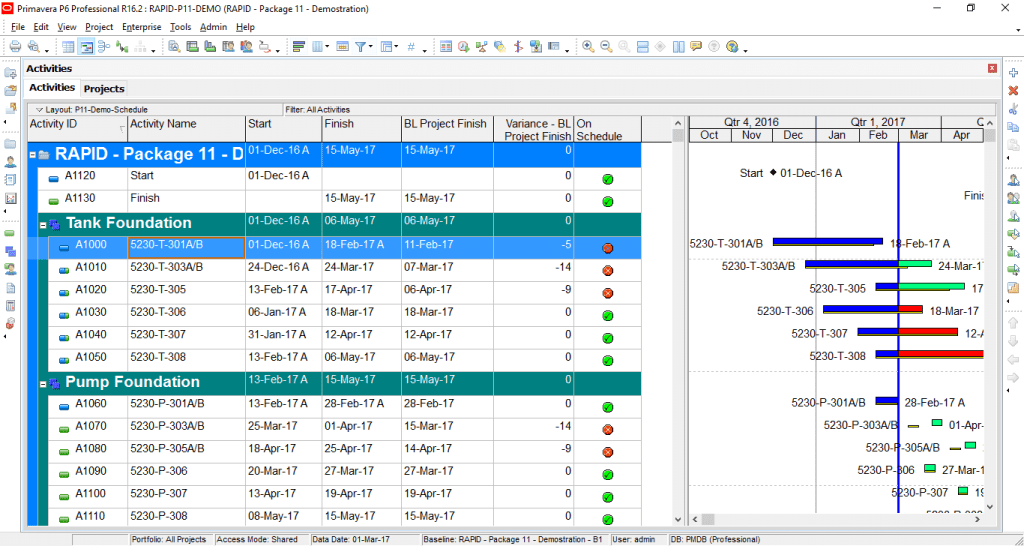
By a quick glance at the schedule, you can detect the activities that are behind the baseline schedule.
It is a good visual for quick analysis of the schedule.
You can follow similar steps to identify the project cost status:
Cost Status User Defined Field Indicators
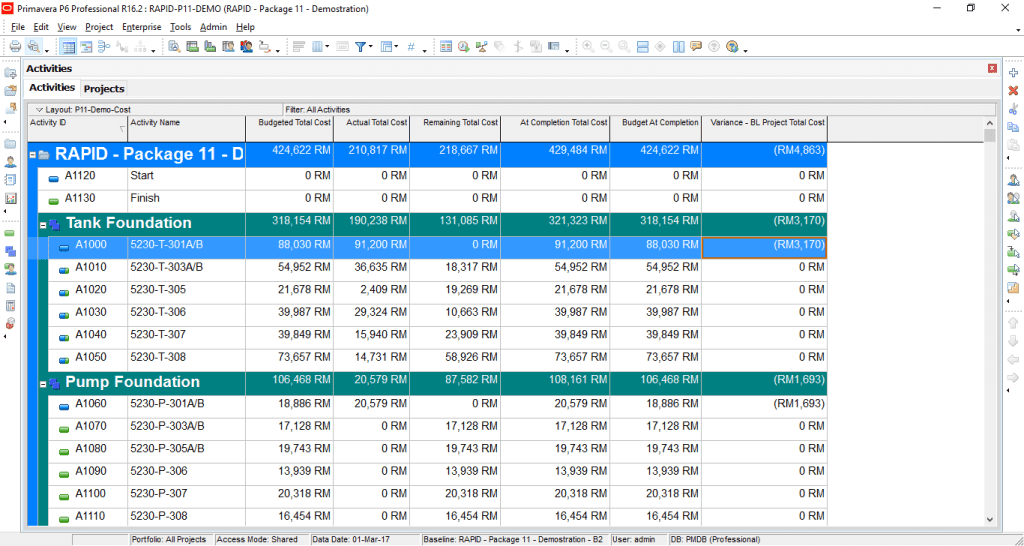
To show the cost status, you can add the following columns on the activity table:
Budget At Completion (BAC): BAC is the total budget allocated to the project. It is the Cost from the resource & cost loaded Project Baseline.
At Completion Total Cost = Actual Total Cost (AC) + Remaining Total Cost (ETC)
Variance – BL Project Total Cost: is the difference between the “At completion total cost” and the “Budget at completion”.
Variance -BL Project Total Cost= Budget At Completion – At Completion Total Cost
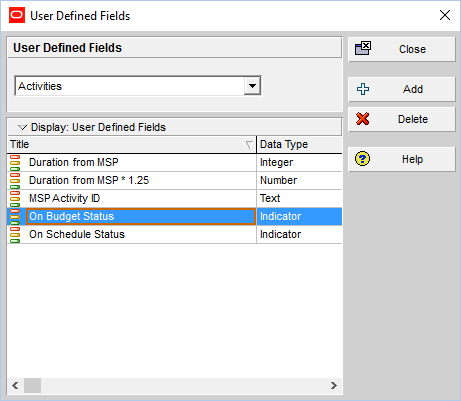
Step 1: Add User Defined Fields (UDFs)
Go to the Enterprise menu -> User Defined Fields.
Click Add to create new.
Step 2: Select the “Data Type” as “Indicator”
Enter the Title for your user defined field and select “indicator” as the “Data Type”
Step 3: Apply the “Global Change”
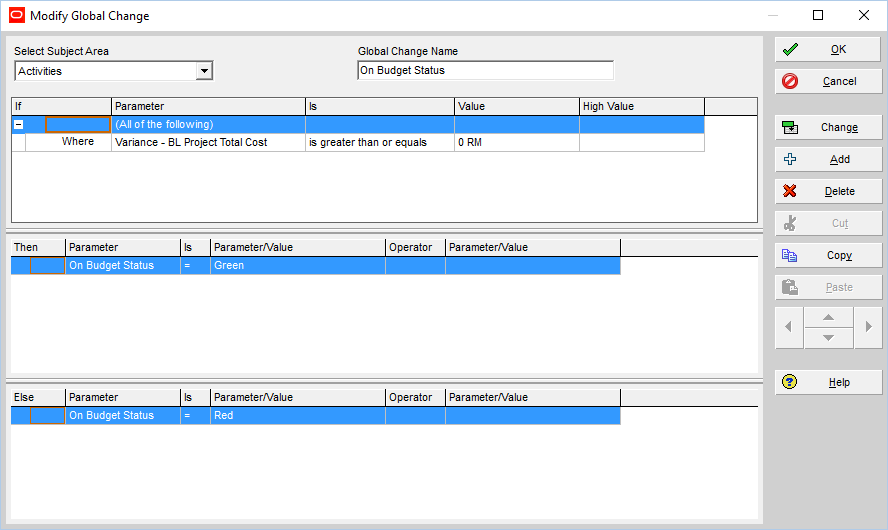
Now to apply the “On Budget Status” indicators to the entire schedule, apply the Global Change:
Go to the Tools menu -> Global Change.
Click New.
After creating a new global change, define the cost status indicator parameters as illustrated below:
Step 4: Add the Cost Indicator Column to the Activity Table
To visually see the schedule status, add the “On Budget Status” User Defined Field to the activity table:
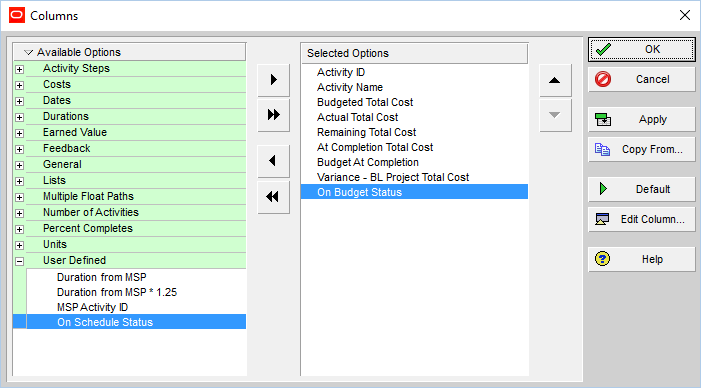
Here is the result:
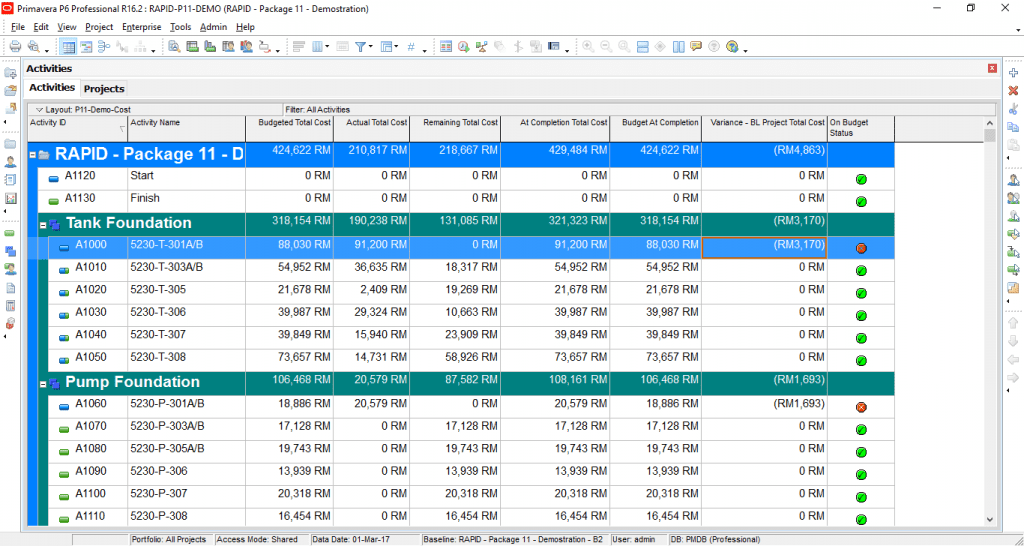
As demonstrated in this tutorial, you can visually evaluate the schedule or cost status by using user defined field indicators.
I hope this tutorial provided clear instructions on how to add traffic light indicators in Primavera P6 to quickly assess and highlight the cost/schedule status.
If you have any question, please post them down below. I will make sure that I will go through as many questions as I can and assist you in answering your questions.
Additional Resources:

About the Author, Khuong Do
 Khuong Do is a Project Planner in Civil Engineering, Transportation, and Oil & Gas Industry. He has worked as a Primavera Consultant Specialist since 2006 and willing to share his passion for Primavera through lots of Tips & Trick on his personal blog.
He holds a Civil Engineering degree and a Bachelor of Information Management System. Now he is working in Petronas RAPID project, one of the biggest Refinery and Petrochemical complex, in Pengerang – Malaysia


![[Free Masterclass] 5 AI Use Cases for Project Controls You Can Start Using Tomorrow](https://www.projectcontrolacademy.com/wp-content/uploads/2026/01/H-Flyer-JAN-2026-Webcast.jpg)

![[Free 90-min Masterclass] How to Avoid Project Delays Turning into Costly Claims](https://www.projectcontrolacademy.com/wp-content/uploads/2025/08/September-2025-Webcast-Chris-Carson-H01-Yellow-2048x1152.jpg.webp)
![[Free 90-min Masterclass] The Ultimate Leadership Recipe for Project Professionals](https://www.projectcontrolacademy.com/wp-content/uploads/2024/08/4-2048x1152.jpg.webp)


